Photograph your recipe
Upload a clear recipe image, import a Word document or enter ingredients manually.
Photograph a clear printed recipe. Food Label Helper orders the ingredients, highlights possible allergens, flags missing information and prepares an editable draft for your chosen label size.
More than 15 years of experience
in food technology and compliance support
Ingredients:
wheat flour 300 gapples 250 gsugar 120 gbutter 100 gegg 100 gIngredients: WHEAT FLOUR, apples, sugar, BUTTER (MILK), EGG.
The tool guides you through the common fields, shows what still needs checking and suggests a label size based on the amount of information you enter.
Upload a clear recipe image, import a Word document or enter ingredients manually.
Review ingredient order, 14 allergens, QUID and the particulars relevant to your sale model.
Preview the draft at a ready-made or custom size, confirm the facts and save it as a PDF.
Food Label Helper was developed with software specialists to turn a recipe or recipe card into a structured, reviewable and printable food-label draft.
Ingrida Pallo-Busmane · IB FoodTechTake a clear recipe photo on your phone or upload an image.
Check allergens and complete the information prompted by the tool.
Select a suitable label size, confirm the draft and save it as a PDF.
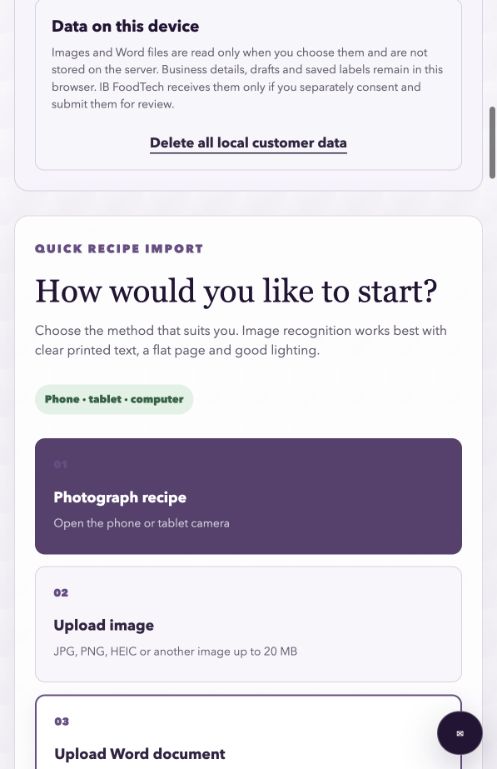
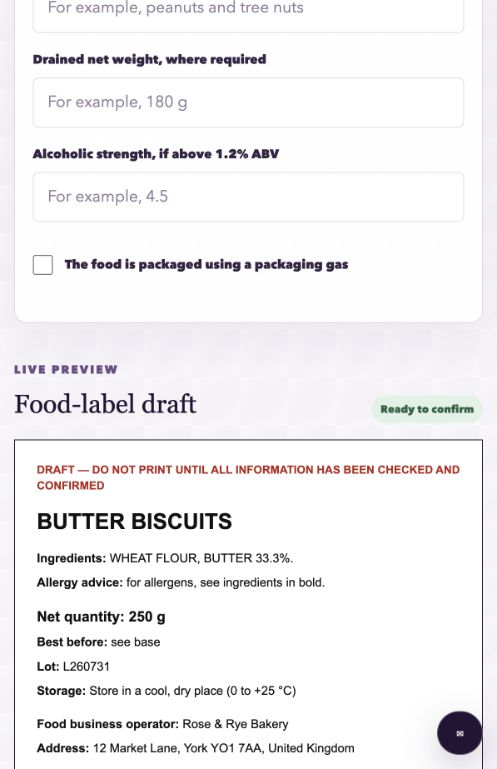
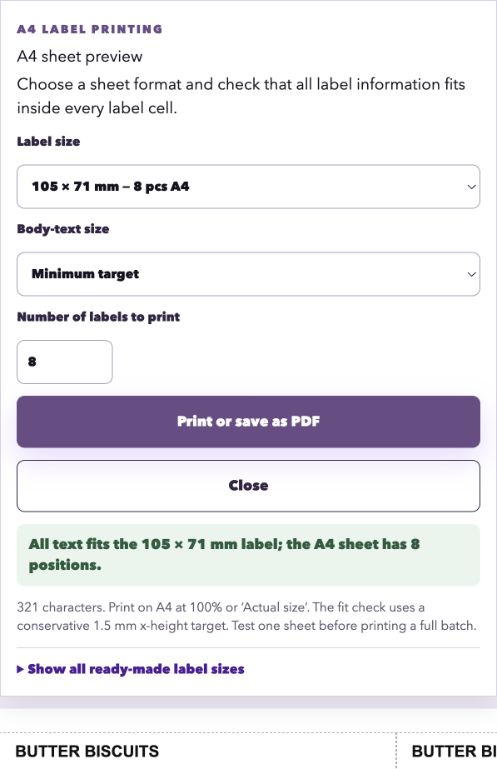
More information needs more space. Food Label Helper checks the content against ready-made label sizes and lets you enter a custom size. You must still verify the finished pack, including the applicable 1.2 mm or 0.9 mm minimum x-height.
The examples use fictional business and product data.
Try the complete tool for seven days without a card. When the trial ends, continue only if you separately choose the monthly subscription.
For a simple, clearly photographed printed recipe, automated reading and the first structured draft can typically take about 20 seconds. Complex layouts, handwriting, image quality, device speed and internet connection can make it take longer. You must then check and complete the draft.
The tool includes a PPDS workflow with the name of the food, a full ingredients list and emphasis of any of the 14 regulated allergens. You remain responsible for correctly classifying the sale as PPDS and checking the final label against current FSA or Food Standards Scotland guidance.
No single answer applies to every business. A documented small-producer exemption may apply in limited circumstances, while claims, product category or the route to market can make nutrition information mandatory. The tool records your decision and flags uncertainty for specialist review.
Yes. The tool uses the food name and recipe to route a draft to category-specific prompts. Bakery products do not display meat fields. Sausages, minced meat, raw meat preparations and fresh meat open the relevant species, origin, traceability, QUID, freezing and approval-decision fields. Facts that cannot be established from the recipe, such as origin or an establishment number, remain marked for the food business to complete.
No. It speeds up drafting and identifies fields to check. The food business remains responsible for the recipe, allergens, shelf life, claims, final artwork and all product-specific requirements.
UK home bakers, market traders and small food producers who regularly prepare English-language food labels. Northern Ireland and specialist product categories can require additional checks.
No. The trial does not require a card, does not renew and cannot create an automatic charge. Access ends after seven days. You continue only if you separately choose the £9.99 monthly subscription through Stripe.